Work About
← Back to work Case study · Concept

Help that acts: turning a support chatbot into an in-product assistant

A self-initiated proposal to make users of a B2B sales platform autonomous on small tasks, so Sales and Support can focus on work that needs them.

Role — Senior Product Designer Timeline — 3 days, 2026 Scope — Framing, interaction design, AI prototyping Teams — Solo, with Claude Code & Figma

About this project. This is a proposal, not a shipped feature. It comes from problems I saw every day while working at Sales Marker. The prototype uses synthetic data only. The assistant panel is translated into English for this case study; in the product, the UI and the assistant are in Japanese.

Context

Small questions, big cost

Sales Marker helps B2B sales teams find companies that show buying intent. The product is powerful, but it has many filters, signals and settings.

When users got stuck on a small task, they rarely looked for the answer themselves. They asked their sales rep or wrote to Support. The help existed. Users just didn't use it.

For users (sales reps at client companies)

  • They get stuck on simple tasks: building a filter, setting a target, USP, a feature.
  • Looking for the answer costs more effort than asking someone.
  • Then they wait for a human, only during support hours (weekdays, 9:00–18:00).

For Sales and Support

  • Time spent on low-value requests instead of onboarding, coaching and selling.
  • A workload that grows with every new client.
  • Clients who use less of the product, which puts renewals at risk.

How might we help users solve small tasks on their own, at the moment they need it, without leaving the product?

The numbers

Self-service rarely solves the problem

This is not just my experience. Industry research shows the same pattern.

Business goal

Fewer small-task requests reaching Sales and Support, because users solve them on their own, inside the product.

Baseline

Industry data below, plus an illustrative cost model (no internal data).

Success metrics

  • Share of small-task questions solved without a human
  • Actions completed through the assistant, and how often they are undone
  • Handoffs to Support, and time to resolve them
  • Satisfaction after an answer
Self-service14%

of service issues are fully resolved in self-service

Gartner, 2024

Simple issues64%

of “very simple” issues still end up needing a human

Gartner, 2024

Why it fails43%

of self-service failures: the content didn't match the issue

Gartner via CXM, 2024

B2B15%

of B2B customers resolve issues in self-service alone

Gartner via destinationCRM, 2022

Sales time70%

of sales reps' time goes to non-selling tasks

Salesforce, State of Sales

The numbers

Estimating the cost

I built a simple model with explicit assumptions. The values are illustrative.

Hours lost per month = active clients × requests per client × share of small tasks × minutes per request ÷ 60

ScenarioHours lost / monthResolved by assistantHours freed / month
Low2015%3
Realistic15036%54
High56050%280

The low and realistic resolution rates come from the Gartner figures above: 15% of B2B issues, and 36% of “very simple” issues, are solved in self-service. The high one assumes an assistant that understands context and can act will do better than classic self-service. That is the hypothesis this concept needs to prove.

Findings

Help in two places, and neither one acts

I reviewed the help experience the way a stuck user would meet it. Seven issues stood out.
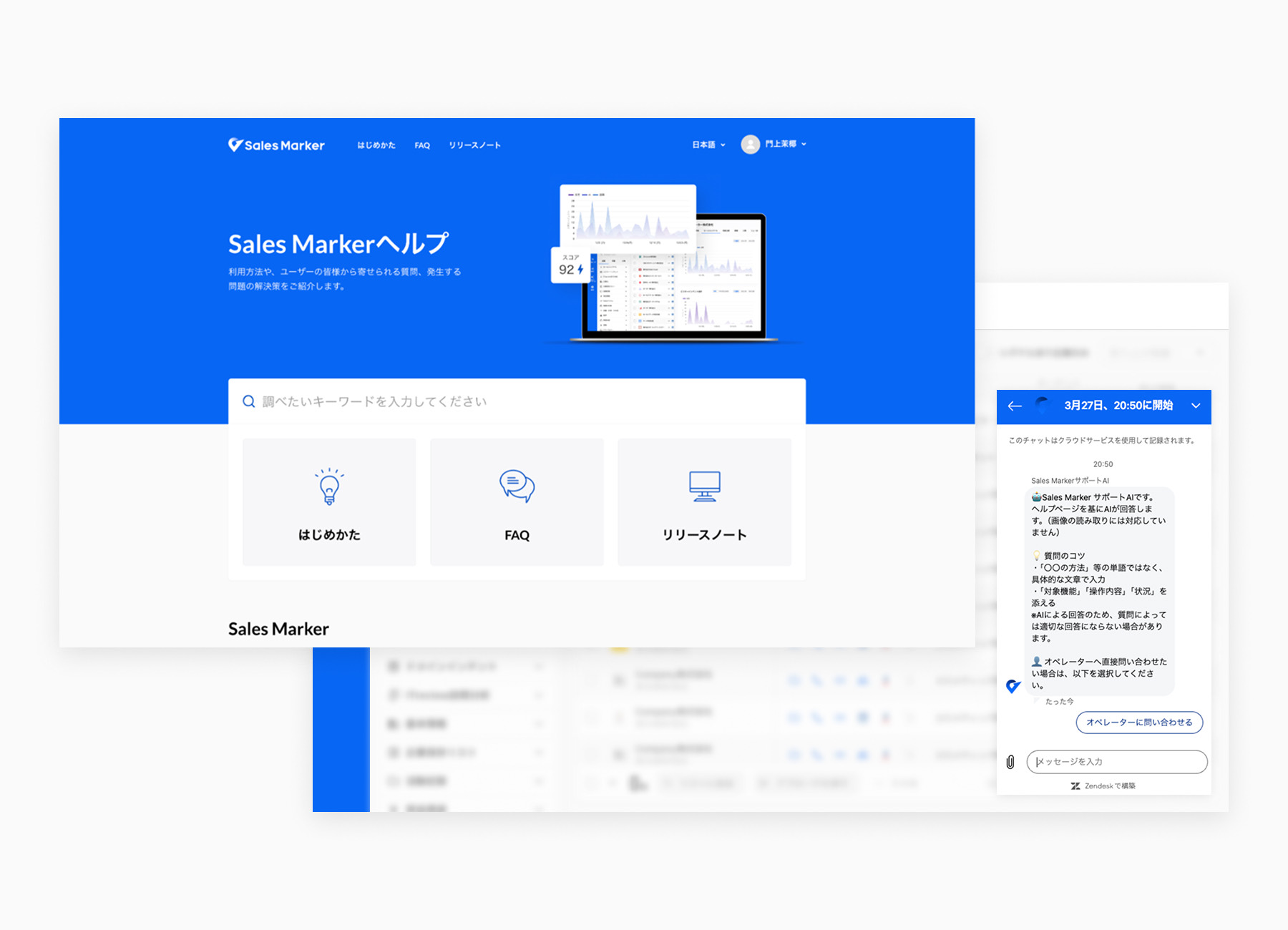
The external help site and the in-product chat widget, side by side

1. Help is split across 2 places

A chat widget inside the product, and an external help site. Neither knows what the other does.
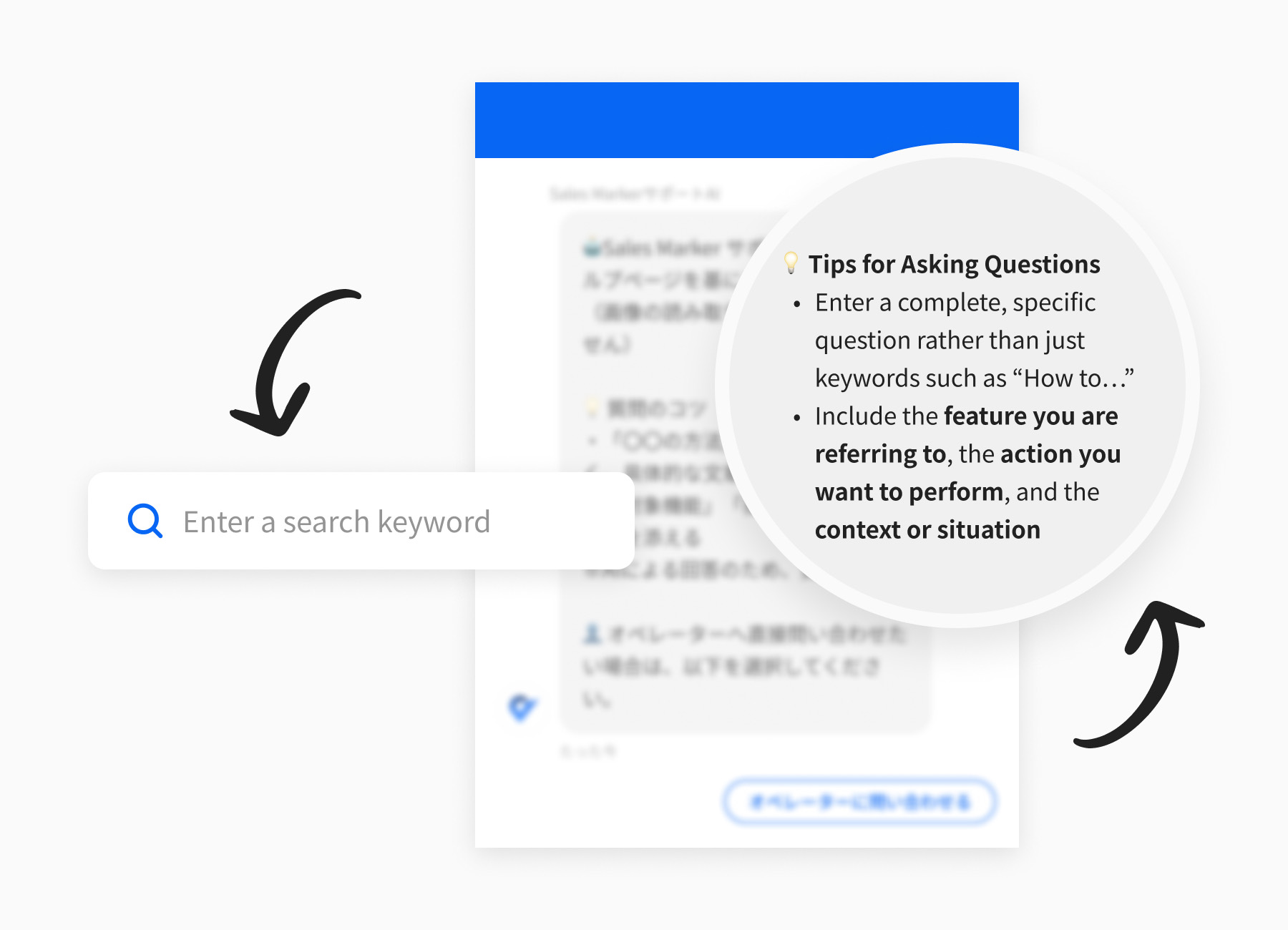
The help site asks for a keyword, while the chatbot's tips ask for full sentences

2. Two tools, opposite instructions

The help site asks for keywords. The chatbot asks users not to use keywords and to write full sentences instead. The burden is on the user to learn how each tool wants to be asked.
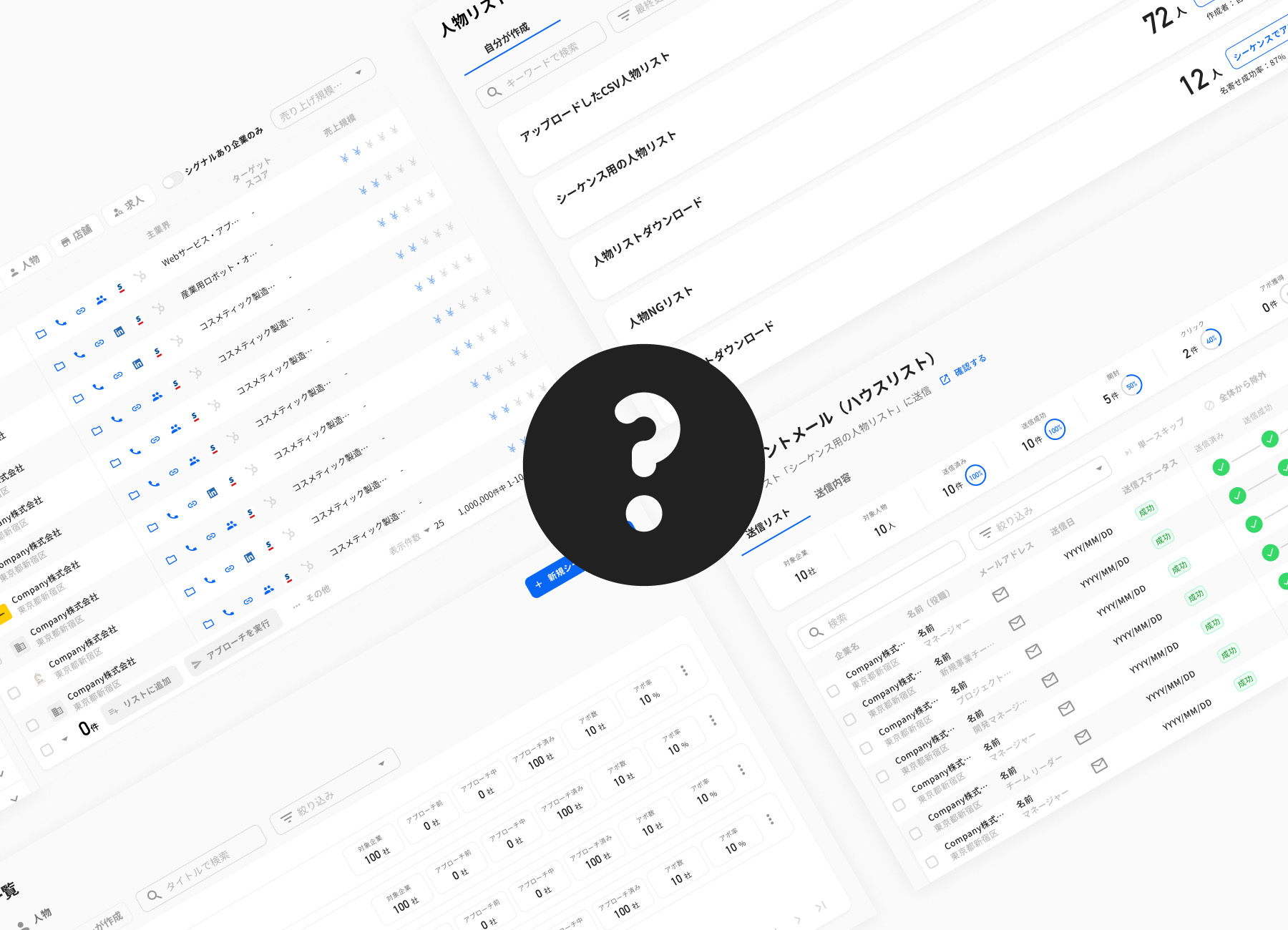
The product's lists and sequences, with a question mark: the chatbot can't see any of it

3. No context

The chatbot doesn't know which screen the user is on, which filters are applied or what is selected. Users have to explain everything again.
An answer made of numbered steps the user has to do by hand

4. It explains, but doesn't act

Answers describe the steps. Then users do everything by hand, or give up and ask a human.
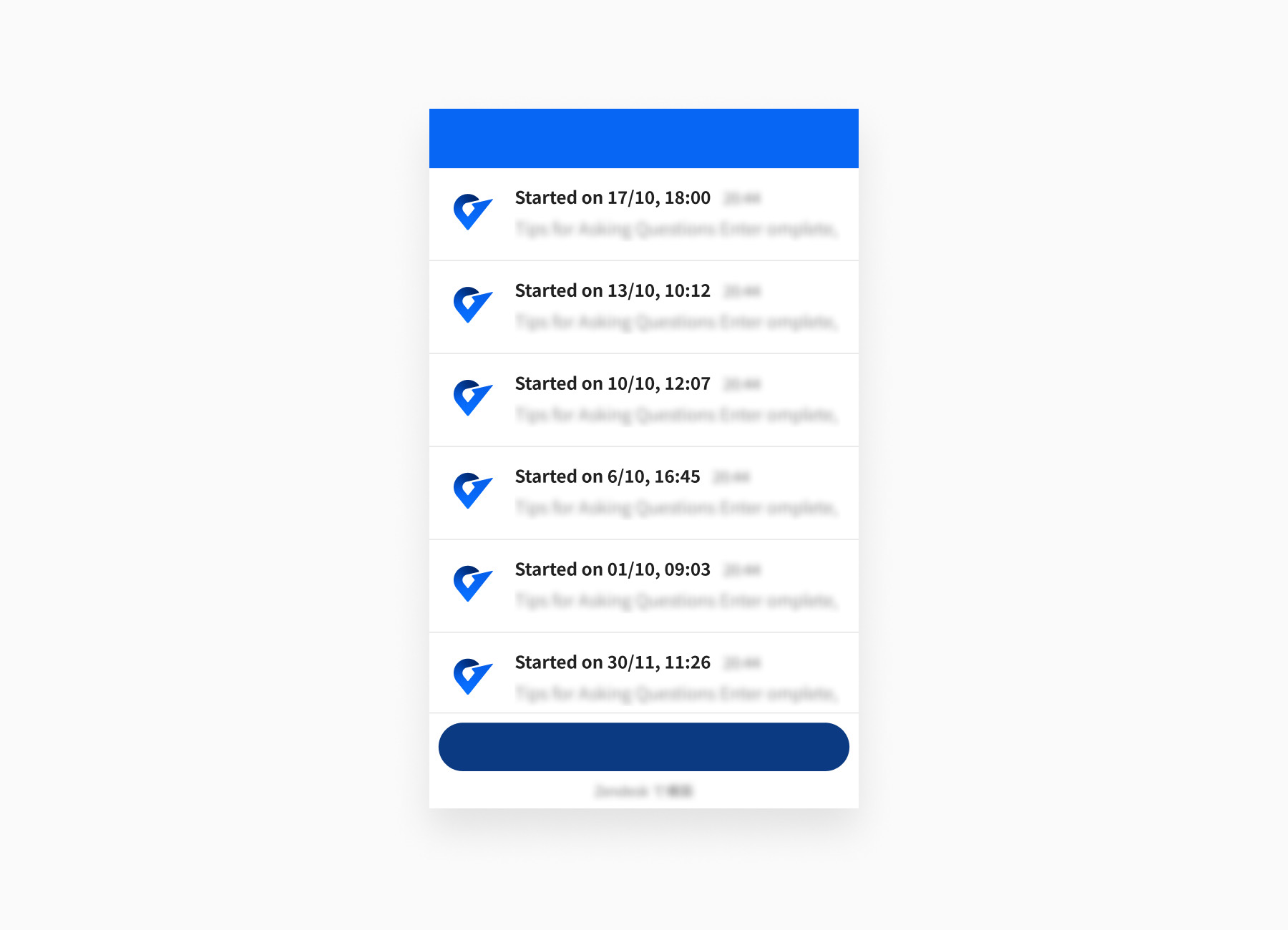
Conversation history where every item is named only by its start date and time

5. History is hard to use

Conversations are named by date and time only. Finding an answer you already got means opening them one by one.
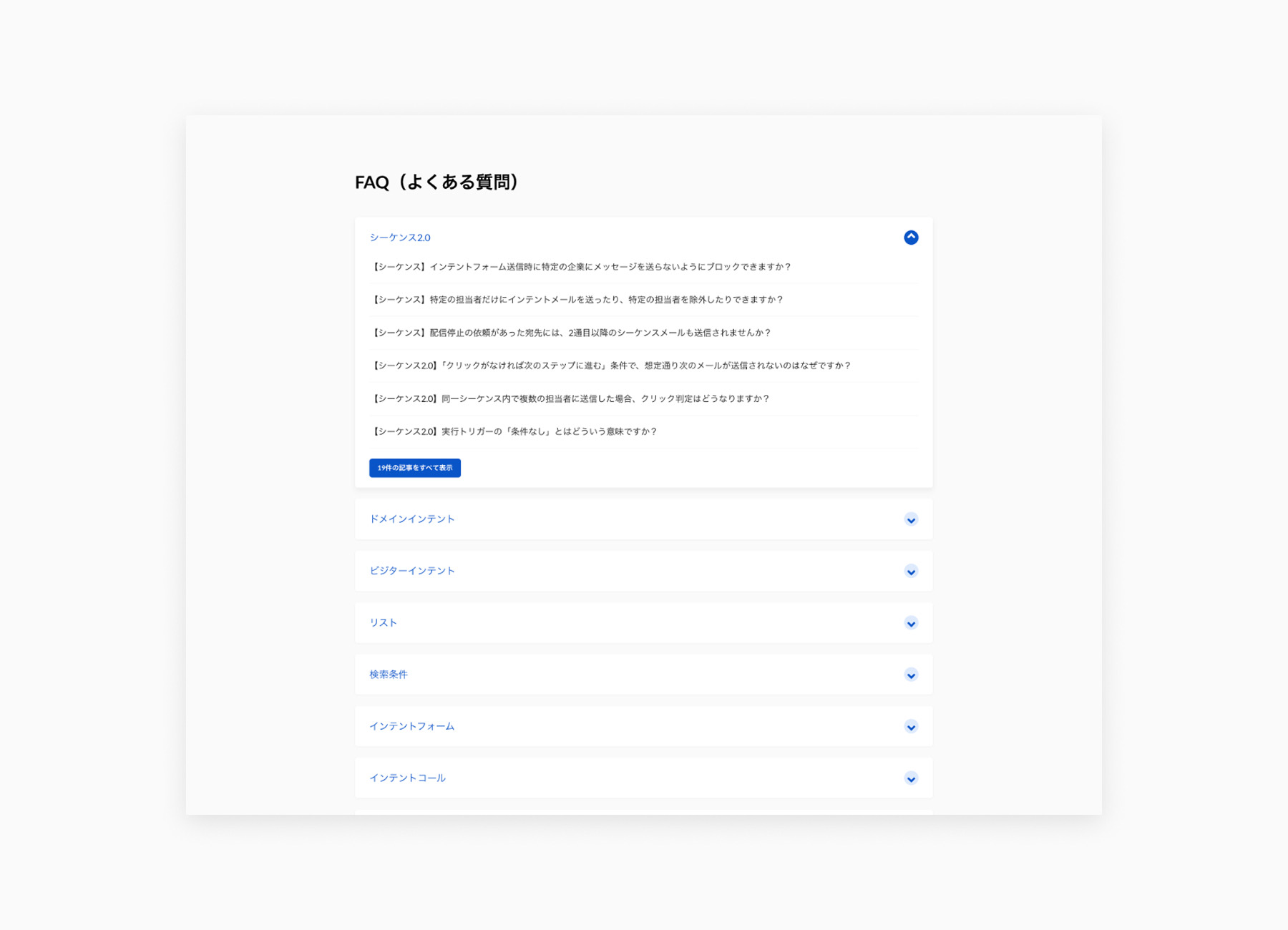
The help site FAQ, organized into feature categories

6. The FAQ is organized by feature, not by task

The help site lists around 27 FAQ categories, each named after a feature. To find an answer, you first need to know what the feature is called. A stuck user usually doesn't: they only know what they want to get done.
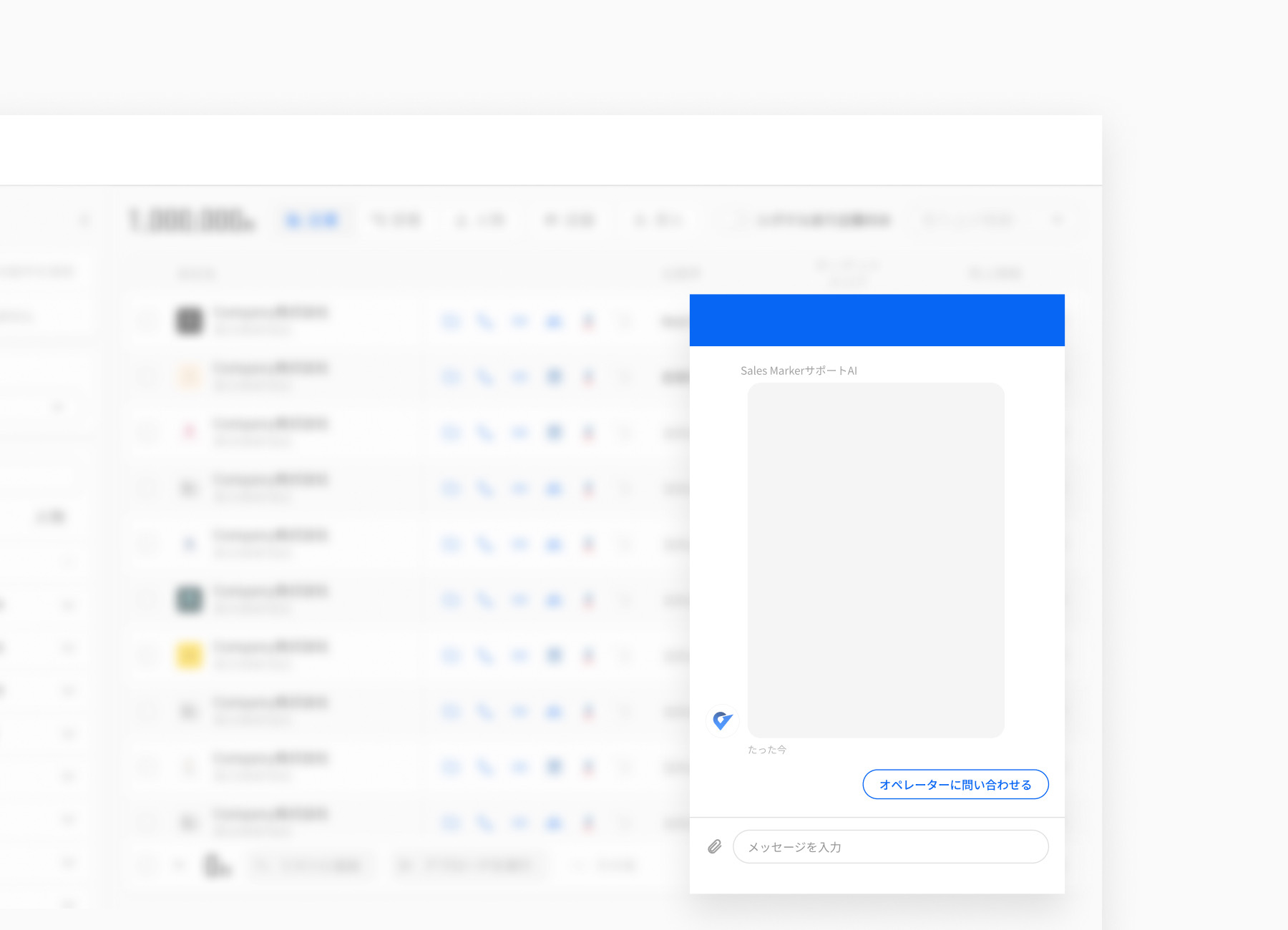
The chat panel open on top of the company list, hiding it

7. The chat gets in the way

The chat panel opens on top of the company list, hiding the screen the question is about. It also opens on the conversation history: users have to click “New conversation” before they can even type.

User journey

Two detours today, one path tomorrow

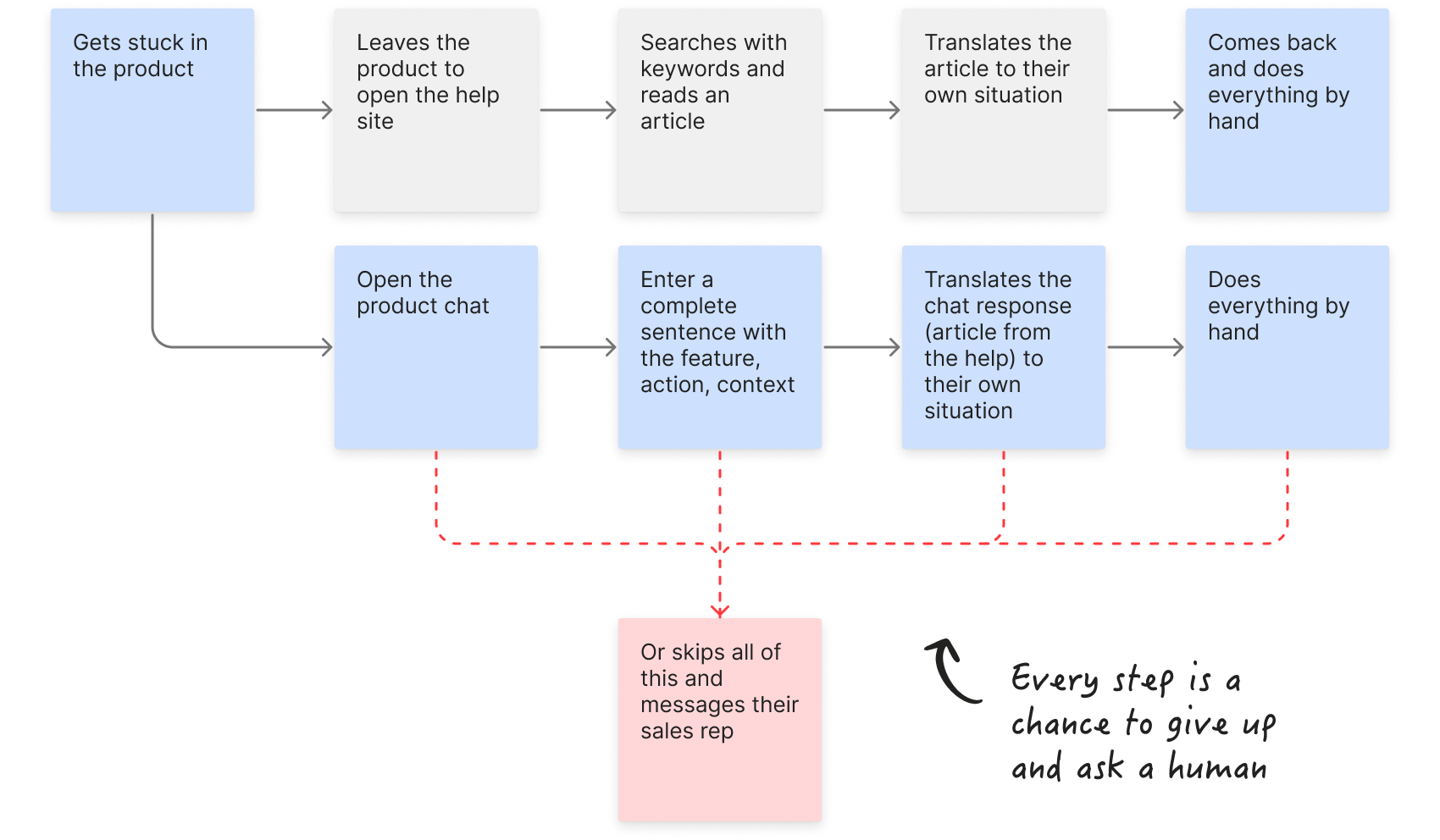
Current journey
Current journey. The user gets stuck in the product. Either they leave for the help site, search with keywords, translate the article to their situation and come back to do everything by hand; or they open the product chat, write a complete sentence with the feature, action and context, translate the answer to their situation and do everything by hand. From every step, a dashed line leads to messaging their sales rep.
  • In the product
  • Outside the product, on the help site
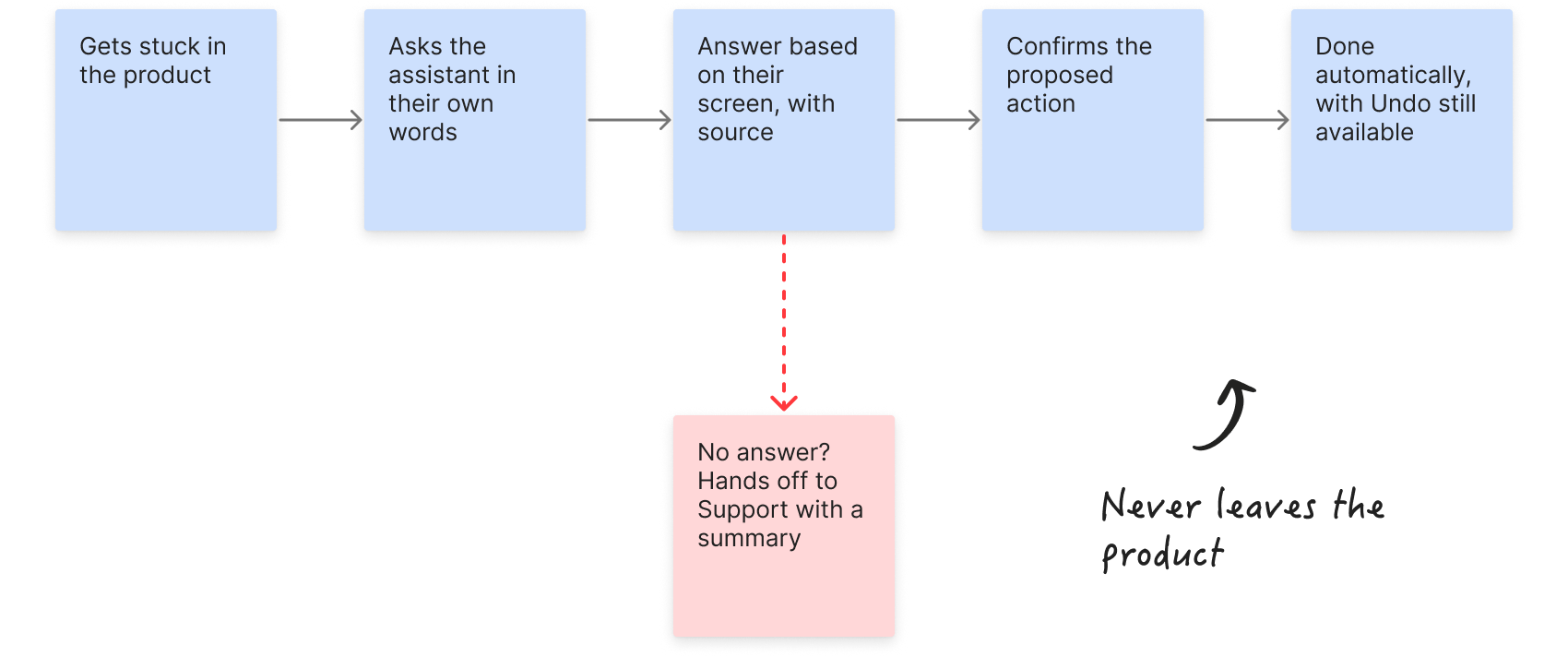
Proposed journey
Proposed journey. The user gets stuck, asks the assistant in their own words, gets an answer based on their screen with its source, confirms the proposed action, and it is done automatically with Undo still available. If there is no answer, the assistant hands off to Support with a summary. The user never leaves the product.

From a place users go, to a source the assistant uses

The help center stops being a place users go. It becomes a source the assistant uses, inside the product.

The help site stays for users who prefer it. It is just no longer the only way to get unstuck.

Design principles

Five rules for help that acts

Each principle answers one of the findings. I used them to judge every variant, and wrote them into CLAUDE.md so Claude Code followed them too.
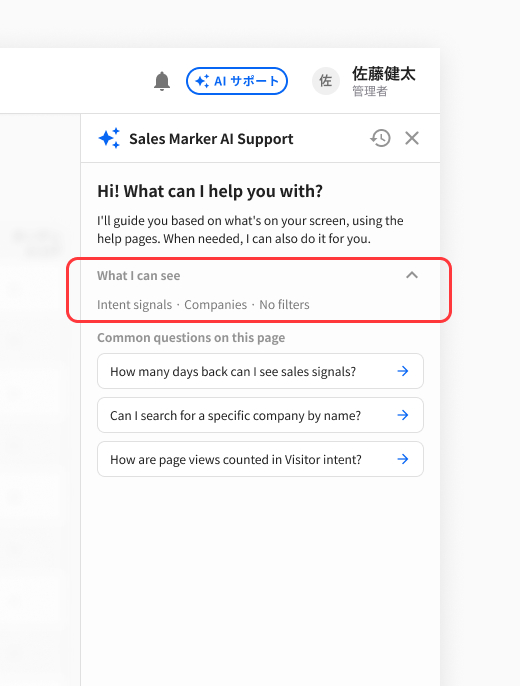
Assistant panel open beside the list, showing “What I can see: Intent signals · Companies · No filters”

1. Start from where the user is

The assistant already knows the screen, the filters and the selection. Users never explain what the product can see.

In the UI: the assistant opens next to the list, not on top of it, and shows the context it picked up (“You're on Signal, 3 filters applied”).

Answers findings 3 and 7
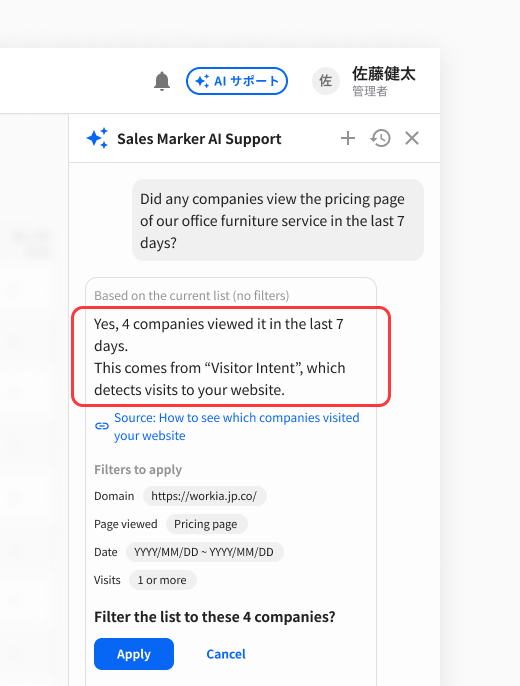
Answer that starts with the result, then names the feature: “This comes from Visitor Intent, which detects visits to your website”

2. Speak tasks, not feature names

Users know what they want to do, not what the feature is called. Answers start from the goal; the feature name comes second.

In the UI: “To find companies interested in your product, use Intent signals…” rather than “Intent signals let you…”

Answers findings 2 and 6
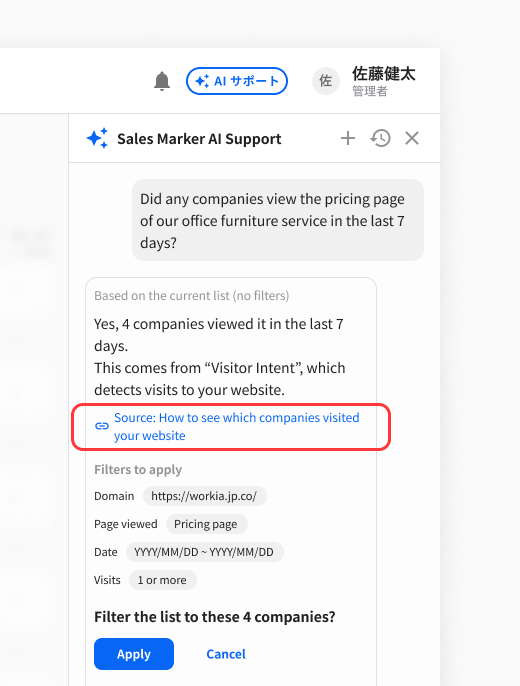
Source link under the answer: “How to see which companies visited your website”

3. Show where the answer comes from

Every answer links the help article it is based on. Users can check it in one click, and trust grows over time.

In the UI: a source chip under each answer.

Makes AI answers trustworthy
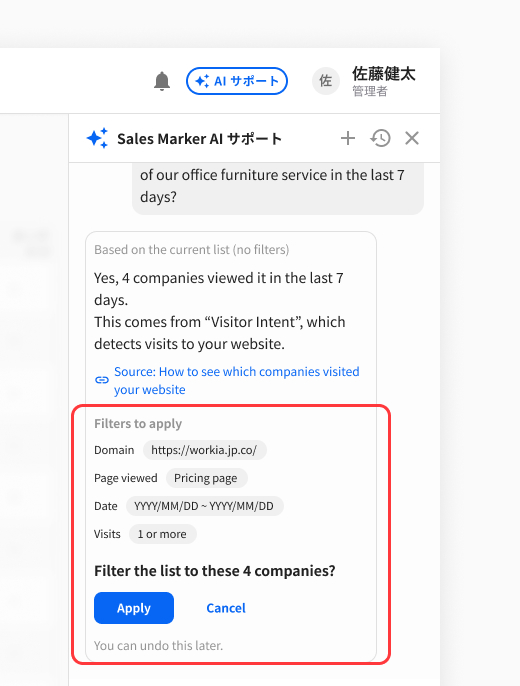
Proposed filters with Apply and Cancel buttons, and the note “You can undo this later”

4. Offer to do it, never do it without asking

The assistant can propose an action, but it never runs one on its own. Every action must be confirmed by the user first, and can always be undone afterwards.

In the UI: “Apply these 3 filters?” with a preview of the result count; nothing happens until the user confirms, and an “Undo” stays available after.

Answers finding 4
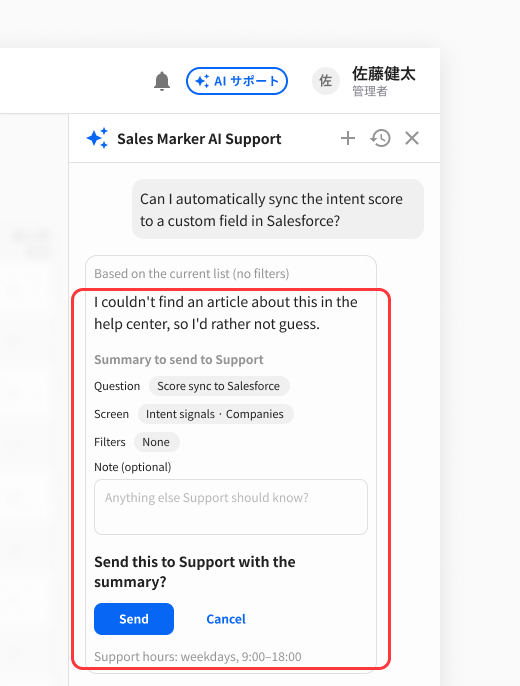
Answer saying no help article was found, with a summary to send to Support, an optional note and support hours

5. Say “I don't know” early, and hand off with context

When the help center has no answer, the assistant says so instead of guessing. The handoff to Support carries a summary, so nobody explains twice.

In the UI: “I couldn't find this in the help center. Send it to Support with a summary?”, with support hours shown.

Answers finding 1

From principles to CLAUDE.md

The same rules, written as instructions for Claude Code:

## Principles (never break these) - Use the current screen, filters and selection. Never ask for what the product already knows. - Start answers from the user's goal. Mention the feature name after. - Every answer links its source article. No source = say you don't know. - Every proposed action needs the user's confirmation. Never run an action without it. - Every action can be undone. - If unsure: say so, offer handoff to Support with a summary of the conversation. ## Language - UI and assistant in Japanese, polite but concise (です/ます).
Scoping the first launch

At launch: one action per answer, only when it helps

Technically, the assistant could do almost anything the product can: filter, build a list, then launch a sequence on it. For the first launch, I limited it on purpose. It suggests at most one action per answer, and only when that action is possible and easy to undo. Three reasons:

Actions don't carry the same risk

A sequence sends emails to real prospects. It can't be undone, and it speaks for the client's brand.

Errors add up in a chain

A slightly wrong filter makes a wrong list, which sends a sequence to the wrong people.

Trust is earned

Users need to see the assistant get simple things right before they hand it heavier ones.

Scoping the first launch

Four levels, sorted by how reversible they are

Level 0

Explain

✅ Always

Answer, guide, link the source.

Level 1

Act on the view

✅ At launch, with confirmation and instant undo

Apply filters, sort the list, open a screen.

Level 2

Create in the product

⏳ Next version, with preview and undo

Create a list, add companies. Lists can be shared and can feed a sequence.

Level 3

External effect

❌ Never by the AI: it prepares, the user launches

Launch a sequence, export, Salesforce sync, use credits.

No chained actions at launch. Multi-step plans come later, shown in full and confirmed step by step.

Scoping the first launch

Questions are open, actions are not

Users can ask anything, in their own words. But they don't command the assistant: it proposes actions, from a short closed list — apply filters, sort the list, open a screen, etc.

Everything else — complex requests, chained steps, risky actions — gets one generic answer: an explanation, the source and, when useful, a link to the screen where the user can do it.

Two details set expectations: the input says “Ask a question” (質問を入力してください), not “What should I do?”, and the suggested questions on each page show what works well.

Chained action
Process

Explored ideas: default state

How the panel looks when it opens, before the user asks anything. The context it picks up changes with each page.

Signal page

Mail page

Sequence page

Process

Explored ideas: filled state

What the panel shows once the user has asked something.

Suggestion clicked — answer only

Typed question — answer with an action — action confirmed — result

Undo an action — result

No answer — handoff to Support

Process

Proposed test plan

The concept is not tested yet. This is how I would test it before a pilot.

Test tasks

#Task given to the participantWhat it testsSuccess looks like
1“You're on Signal. Find out how far back you can see sales signals.”Discoverability, suggested questionsOpens the assistant on their own and gets the answer without leaving the product
2“Find the companies that looked at our pricing page this week.”Typed question, proposed actionUnderstands the preview and applies the filters, knowing what will happen
3“That's not the list you wanted. Go back.”Undo, trustFinds Undo right away; the list is restored without help
4“Can our intent score sync to a Salesforce custom field?”“I don't know” and handoffDoesn't take a wrong answer as true; sends it to Support with a note
5After the session: “Would you use this instead of asking your sales rep?”Overall trustSays yes, and can say why

What I would test

  • Who: 3 to 5 Sales team members. Their prospecting work is the same as our users'.
  • How: 30-minute sessions, thinking aloud, one task per scenario, worded without hints.
  • Success criteria: task done without help, trust in the answer, no unwanted action.

Known limits

  • Sales know the product better than clients. They can validate the scenarios, not how easy the assistant is to discover.
  • Next step: a pilot with a few clients, measured by requests reaching Support.
Expected impact

Projected, not measured: what a pilot would need to prove

Time freed~54 h

per month for Sales and Support

Illustrative, realistic scenario — to measure in a pilot

AutonomyTBD

Small-task questions solved without a human

Hypothesis — to measure in a pilot

TrustTBD

Undo rate on actions proposed by the assistant

Hypothesis — to measure in a pilot

Designing with Claude

Who did what

Claude

I used Claude as a design partner from framing to prototype. It sped up research, writing and building. The problem, the decisions and the limits stayed mine.

StepWhat I didWhat Claude did
Problem framingPicked the problem from what I saw every day at Sales Marker; defined both sides (users, Sales and Support)Suggested project formats; helped structure the problem statement
Current-state auditMapped the current screens in Figma: product, chat, help siteReviewed the screens and listed issues (FAQ by feature, chat covering the list); I kept, cut and reworded them
NumbersChose public data and explicit hypotheses over internal numbersFound public studies (Gartner, Salesforce); built the illustrative cost model
Principles and scopeSet the non-negotiables: every action confirmed by the user, always undoable, one action at a timeDrafted the principles; proposed the four reversibility levels; I refined both
Project setupDecided the naming, Japanese UI, English case studyWrote CLAUDE.md and the brief; extracted design tokens from my Figma variables
Case study draftEdited, cut and rewrote in my own voiceWrote a first draft following my existing case study structure
Explored ideasDesigned the panel and each state in Figma: empty, answer, action, undo, no answer, sent to Support; reviewed every animation and caught what looked wrongTranslated the panels to English; built and retimed the animations in Figma (panel opening, cursor path, list resizing); fixed the issues I pointed out
← Back to work Next work →