
BoursoBank
Founded in 1998, BoursoBank is a leading French online bank offering digital banking, online brokerage, and financial information services. As a 100% online bank, it provides a wide range of products, including life insurance, consumer loans, mortgages, and savings solutions. Its value proposition focuses on low banking fees, a fully digital experience, and mobile-first banking.

My role
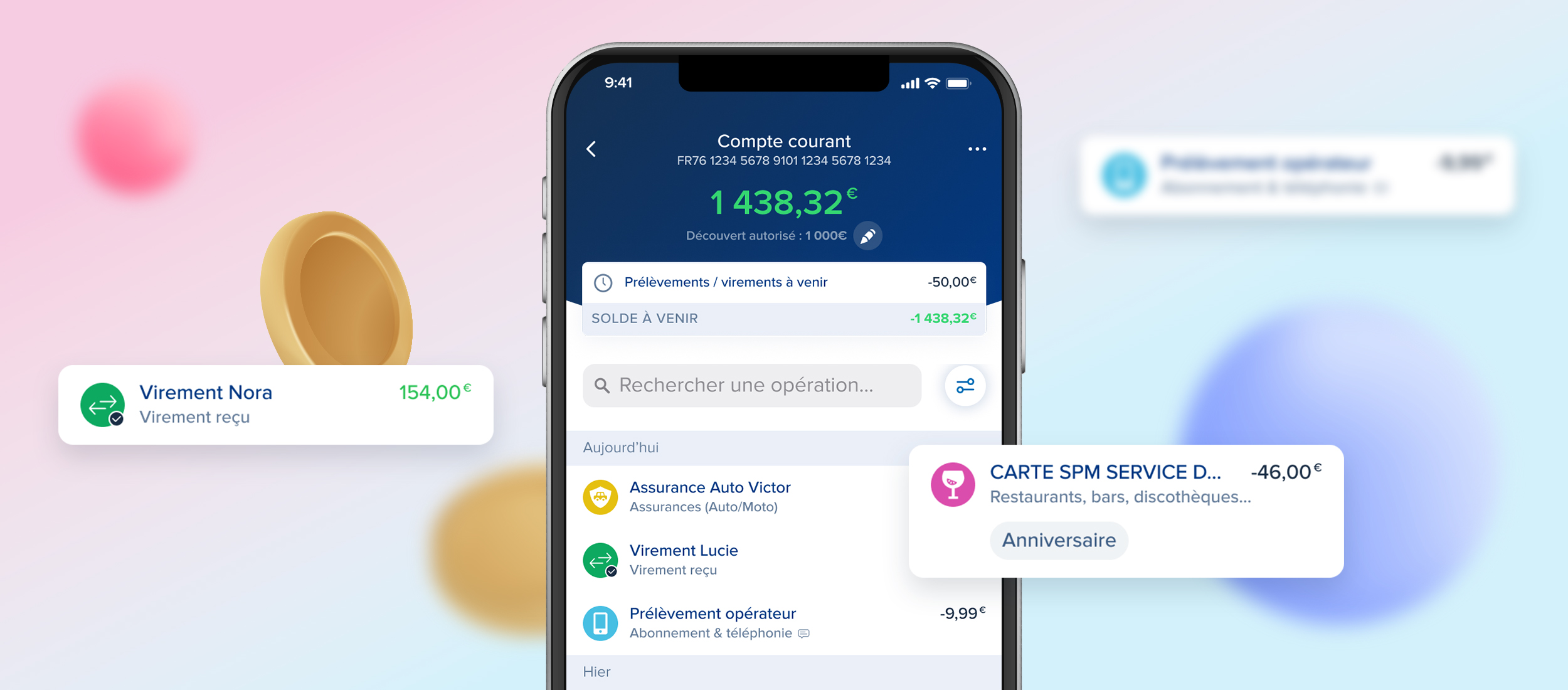
Within the Marketing department, I worked as a UI/UX Designer in the Credit team. I designed interfaces for three products: Personal Loans, CLI€ Financing, and MyLombard Credit. I was responsible for designing landing pages, improving the subscription journey, optimizing existing interfaces, and creating new app screens. I also produced visual assets for communication and marketing campaigns.
In collaboration with the Design team, I contributed to the evolution of the Design System and maintained its documentation.
Interface
Each year, I worked on projects supporting marketing initiatives and business objectives, ranging from redesigning product pages to creating new digital services.
Within the Credit team, I contributed to several key projects, including the automation of income calculation, enhancements to the personal loan simulator, and improvements to the loan subscription journey.
The following examples showcase a project promoting the CLI€ payment solution and a project optimizing the MyLombard credit subscription process.

Project overview

Requirement
- Promote the use of CLI€ financing
- Make it accessible from The Corner (BoursoBank online benefits program)
- Integrate the financing solution into BoursoBank’s browser
What is CLI€ ?
CLI€ financing allows you to deal with an unforeseen event or simply to make favorite purchases by facilitating payments from €200 to €2,000. The request is made completely online and the funds are paid immediately or within 14 days. Fees apply depending on the amount borrowed.
Goal
Integrate the possibility of paying via CLI€ financing into The Corner browser in order to:
- Facilitate access to CLI€
- Create new product entry points
- Get as close as possible to the promotion of BNPL by e-retailers
My role
- Create interfaces and prototypes that meet business needs
- Take into account design, technical and legal constraints
- Get as close as possible to the existing browser so as not to distort it
BoursoBank’s browser
Accessible from The Corner within the application, BoursoBank’s own browser allows you to benefit from a better customer experience for e-commerce purchases from partner brands on off-the-shelf sites which offer a discount in the form of cashback or discounts immediate: Hotels.com, Booking, Promosejours, Cdiscount, Samsung, HP…

Constraints
- In order to determine the customer’s eligibility, their bank account is analyzed. In our case, the customer does not select his account but a card. In the back, the card allows you to find the linked account and carry out the analysis.
- A card must be selected first in order to save the data so that it can be pasted at the time of payment.
- The amount of the current basket cannot be identified. Technically, it is impossible to retrieve this data from partner sites.
- A customer cannot combine several CLI€ financings.
Solution

The browser extension includes:
• Pay button: Opens the payment sheet.
• Info button: Provides a reminder on how to use the navigation corner and highlights two products: CLI€ and Bourso Protect (insurance).
• Meatball menu: Redirects users to The Corner environments.
When a customer visits a partner website for the first time, an introductory information sheet is displayed.
By clicking the Pay button, the customer can select the card they want to use. Each card is identified by a dedicated icon, making it easy to distinguish between them. The list of available cards varies depending on the customer’s card portfolio (physical and/or virtual cards).
The customer then chooses their preferred payment method: pay in full or CLI€ financing.

Once the payment method has been selected, a screen highlighting the product’s key benefits is displayed to reassure the customer and present its main advantages before subscription.
The customer is then directed to the subscription page, where they enter the desired financing amount within the available limit. The applicable fees are calculated dynamically and updated based on the selected amount.
Next, the customer selects their preferred repayment date and reviews the repayment schedule.
Finally, they accept the terms and conditions and complete a strong authentication step to confirm the transaction.
Once the authentication is successful, the financing is approved and the funds are made available in the customer’s account.
A confirmation page is then displayed, and the customer receives a confirmation email.
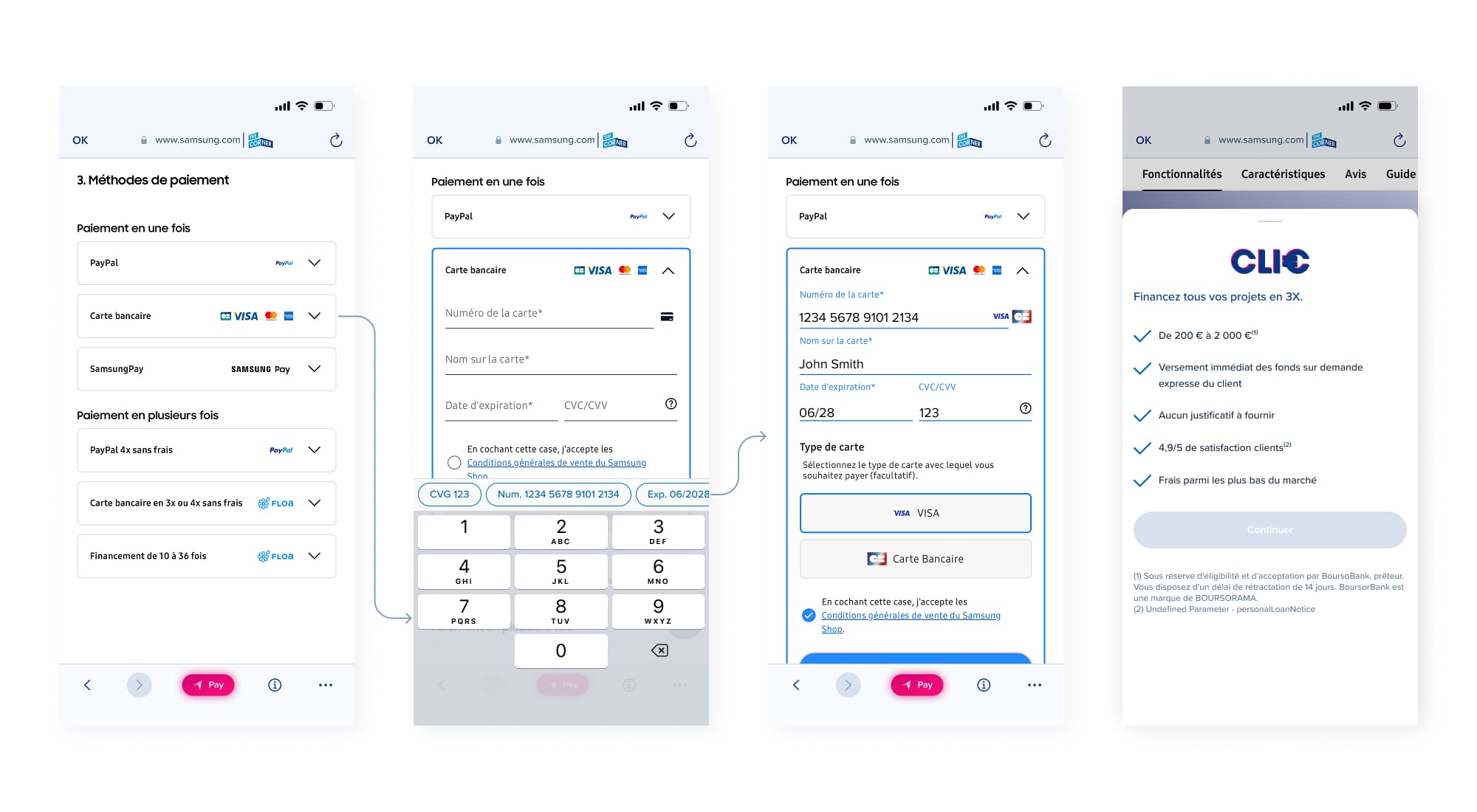
The customer can then finalize their purchase. As their card details have been saved beforehand, they can simply autofill the payment fields.
The Pay button remains available. However, customers cannot subscribe to multiple CLI€ financings at the same time. They must fully repay their current CLI€ financing before they are eligible to subscribe to a new one.

Requirement
- Integrate the revenue detection module into the existing loan journey
- Automate the loan decision by applying the lending rules and calculating the debt-to-income ratio
- Perform all eligibility checks and apply any blocking conditions automatically
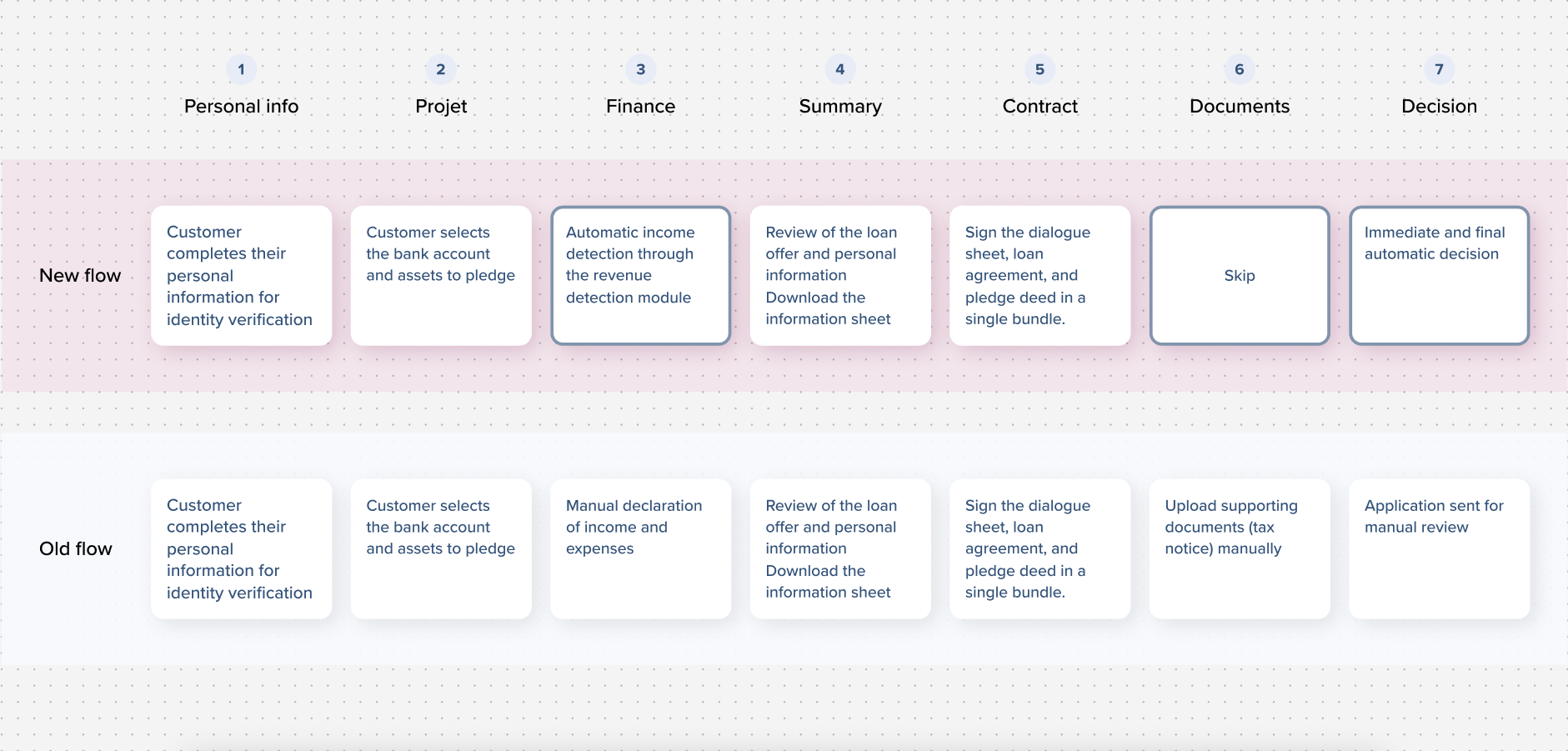
- Eliminate the manual review step by providing an immediate, final decision at the end of the application.
- Remove the need for customers to submit supporting documents
What is mylombard
A Lombard loan is a loan secured by your investments.
You pay only the interest every three months and repay the full amount at the end of the loan or earlier if you wish.
You can borrow up to 50% of the value of your eligible investments, and throughout the loan, your pledged assets must remain worth at least 180% of the amount you borrowed.
Goal
My role
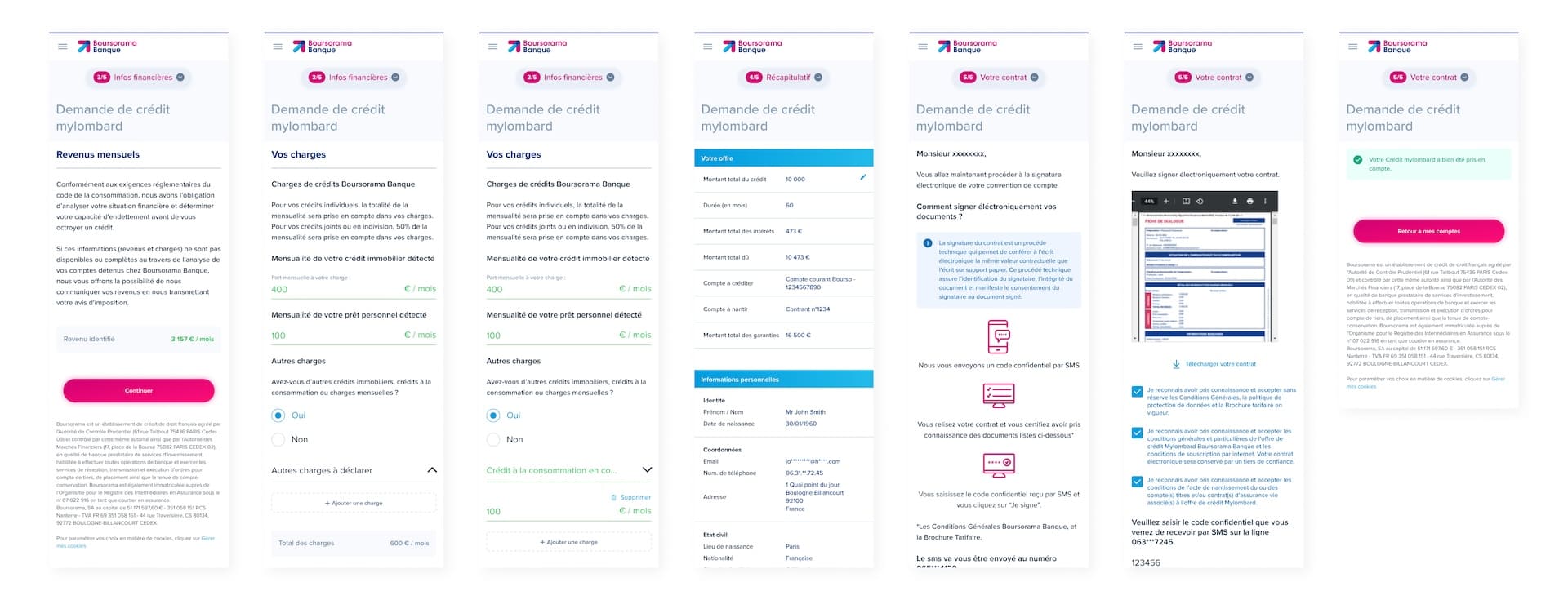
Revenue automation flow
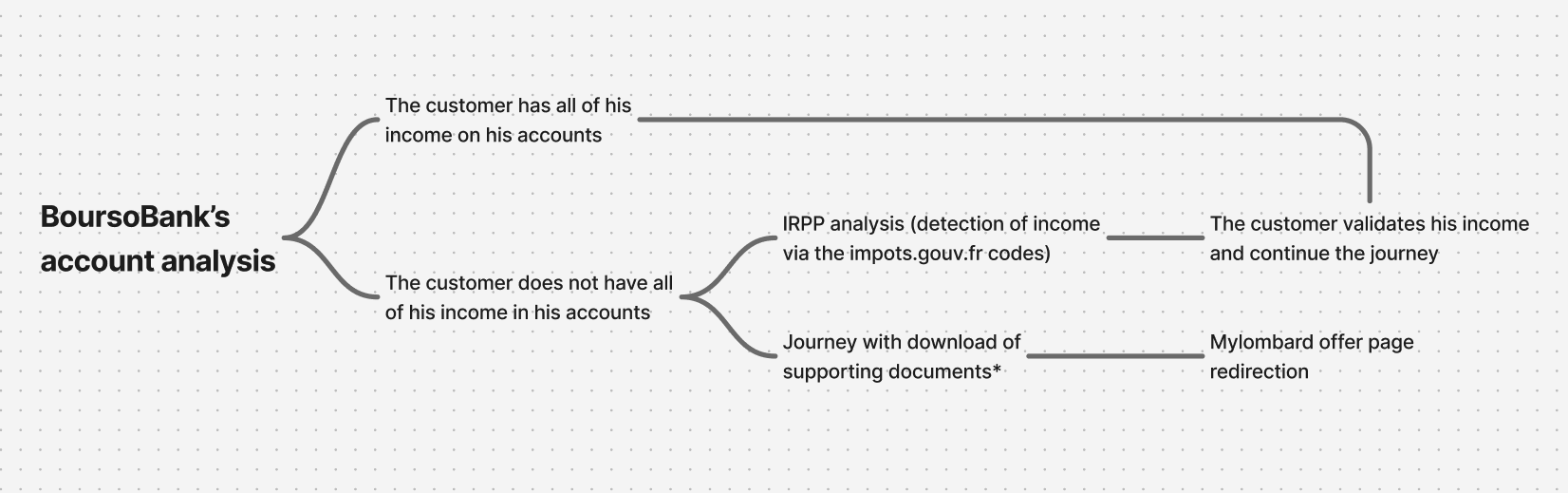
mylomard loan flow
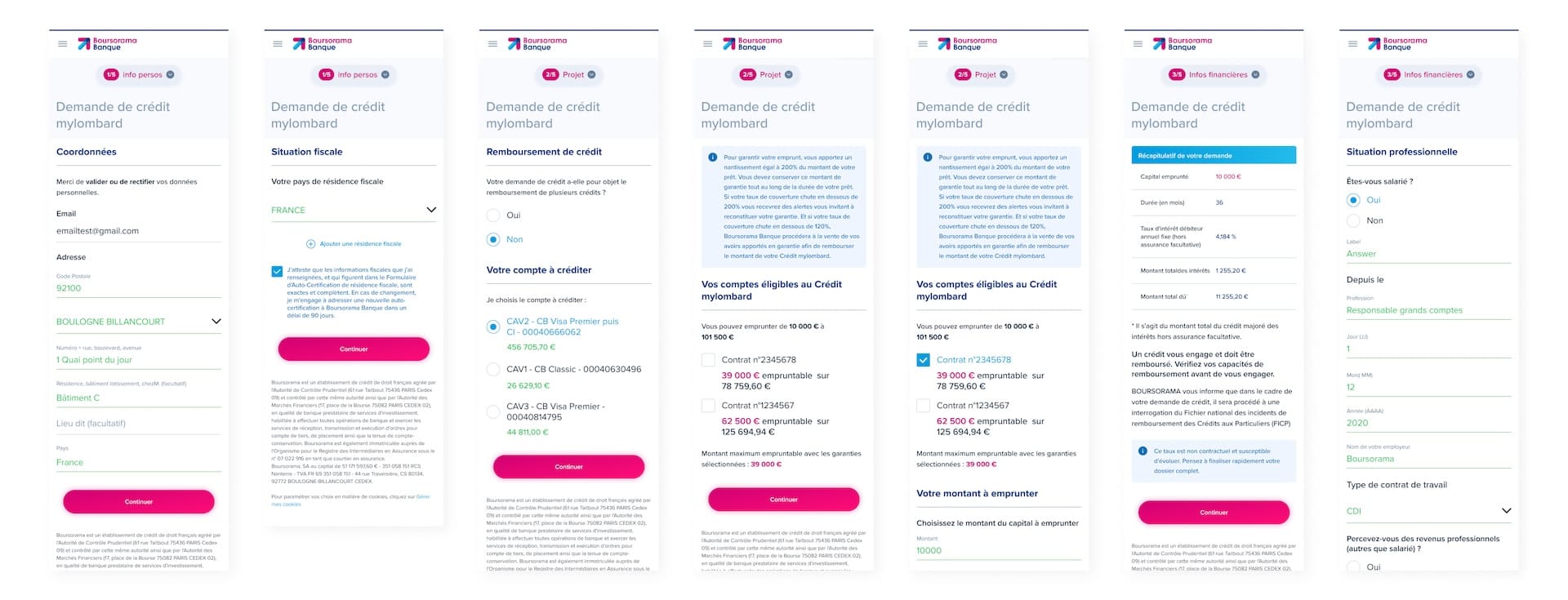
First steps
The customer starts the subscription journey after completing a simulation from the product offer page. The Personal Information and Project steps are identical across all scenarios.
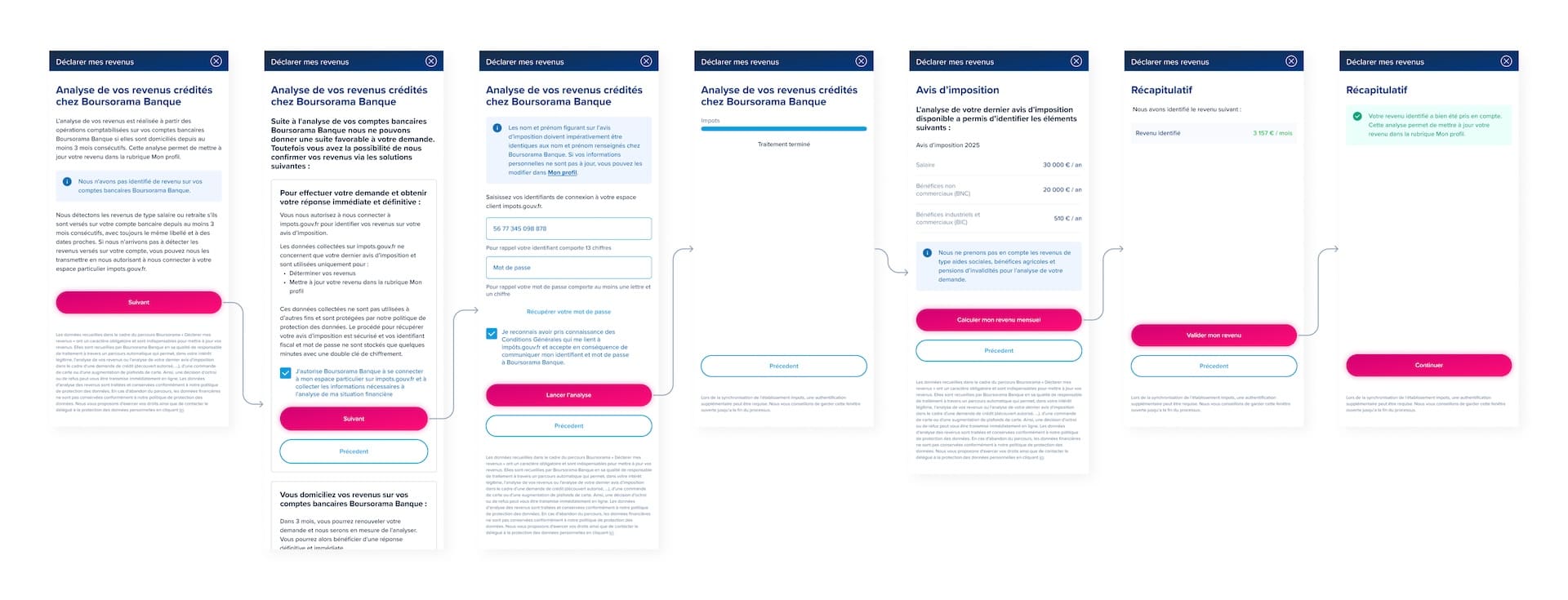
Income Detection
The journey supports four scenarios:
- No income is detected, so the customer authenticates with their impots.gouv.fr credentials for automatic income detection.
- Income is detected but is outdated, so the customer updates it through the detection module.
- Income is detected and already up to date, allowing the customer to continue directly.
- The customer chooses to upload supporting documents instead. They are redirected to the offer page and have 15 days to submit a new application while keeping the same interest rate.
Charges & Completion
Once the income is validated, the customer continues the journey. BoursoBank loan repayments are detected automatically, while existing mortgages and personal loans are pre-filled. Additional external expenses can be entered manually.
The customer then reviews the loan offer and personal information, signs the contract electronically, and completes the subscription. The signed contract is available from their customer area.
Branding
Beyond designing digital journeys, I also contributed to strengthening the brand experience around the product. The goal was to support customers at key moments of their journey through consistent, educational, and engaging content while taking into account business and regulatory constraints. I created various touchpoints, including emails, animations, and product tutorials.
