


What is Sales Marker?
For who ?
- B2B companies with an active new business / sales function
- Example industries : SaaS, HR / Recruitment, M&A, Sales outsourcing, Web production…
Exclusion Criteria
- Solo entrepreneurs
- Small companies, early-stage
- B2C (consumer-focused) businesses
- Highly niche vertical products where intent data is difficult to capture
Role
Lead Product Designer
Product Team
Signal, Approach Team
Timeline
+ 2 year
Scope
Features & Updates
My role
As a Product Designer, I worked across the entire product lifecycle, in close collaboration with Product Managers, Engineers, and QA. I was a part of 2 Product Teams.
I contributed to both new feature development and continuous improvement of existing functionalities, including redesign and maintenance. We opperated in a fast-paced startup environment with rapid iteration cycles, driven by ongoing user feedback and sales requirements.
Signal Team
The Signal team manages the Intent Search pages, List Page with normalization, Intent Powder (product management), and the AI Dashboard in the Sales Marker application.
- QA : 1
- FE : 3
- BE : 2
- Lead Tech : 1
- PDM : 1
Approach Team
- QA : 1
- FE : 2
- BE : 2
- Lead Tech : 1
- PDM : 1
Main tools

Project overview

Sequence
The Sequence function is a core feature that enables users to automate and structure outreach to leads through a predefined series of actions. It centralizes multiple communication channels (e.g. email, calls, SNS) into a single workflow.
Problem
Sales teams often rely on manual and inconsistent follow-ups, leading to missed opportunities and low efficiency. Outreach is fragmented across tools, timing is not optimized, and maintaining personalization at scale is difficult.
Solution
The Sequence function introduces a workflow builder where users can design step-by-step outreach flows.
This allows users to automate repetitive tasks while maintaining control over the communication strategy.
Impact
- Increased efficiency : reduces manual work
- Improved consistency : structured lead journeys
- Better engagement : improves response rates
- Scalability : enables personalized outreach at scale
Role
Lead Product Designer
Product Team
Approach Team
Timeline
+ 2 year
Scope
1st launch and revamp
Sequence setting

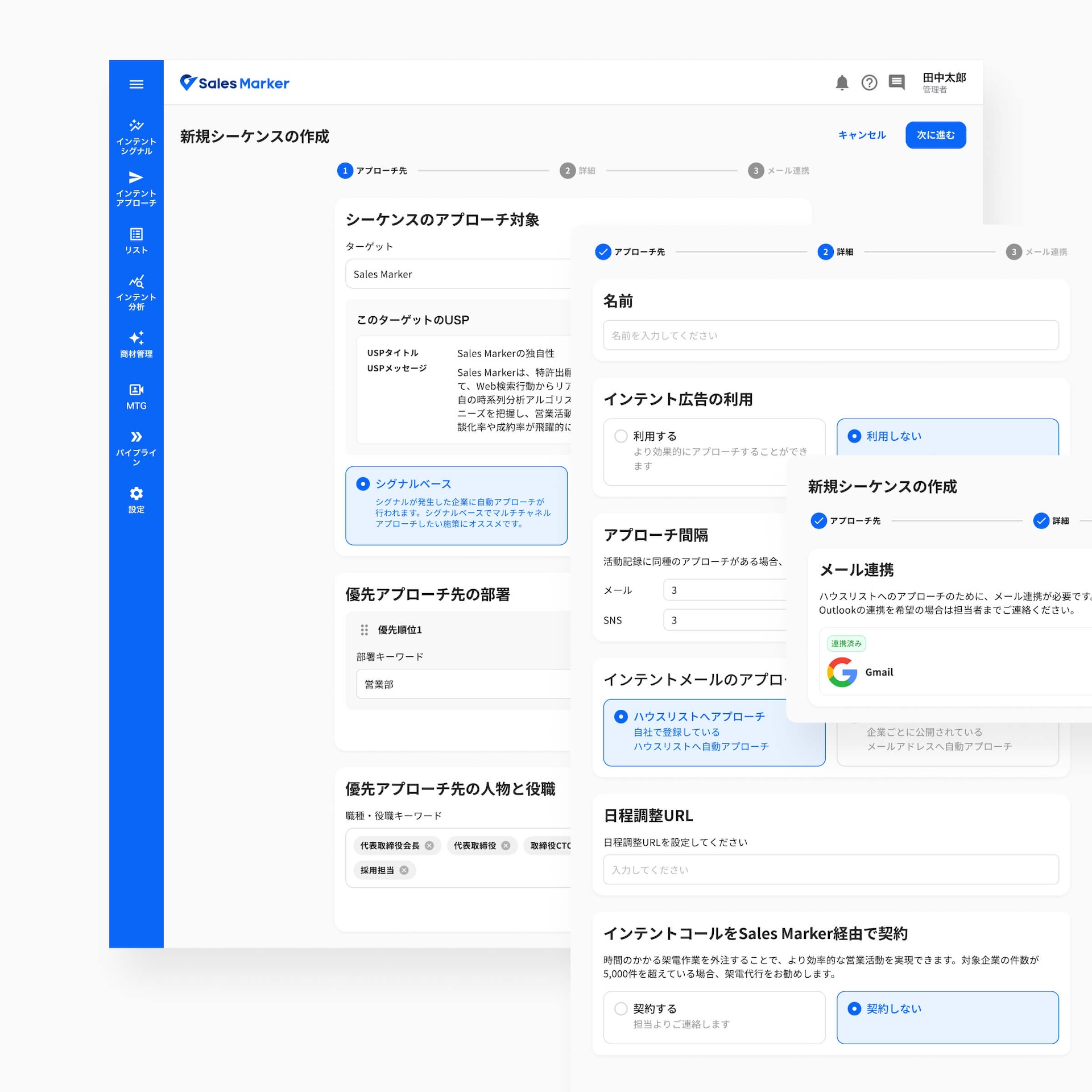
Before
- Sequence list lacks visibility : users cannot quickly distinguish sequences, see the total number of sequences, or understand their status.
- Sequence creation flow groups unrelated settings into a single step (e.g. sequence name, approach intervals, call contract).
- The setting is heavy and lacks guidance to help users understand what to set and why.


After
- Sequence list management is improved with filters, search, and quick status recognition. Users can preview the sequence flow by hovering, without opening each sequence.
- The sequence creation flow is simplified with templates and a one-step, target-based configuration.
- Users can define the target as either a company or a person, making the sequence purpose clearer. Multiple trigger types are added, allowing users to create more flexible and personalized approach flows.
Sequence flow

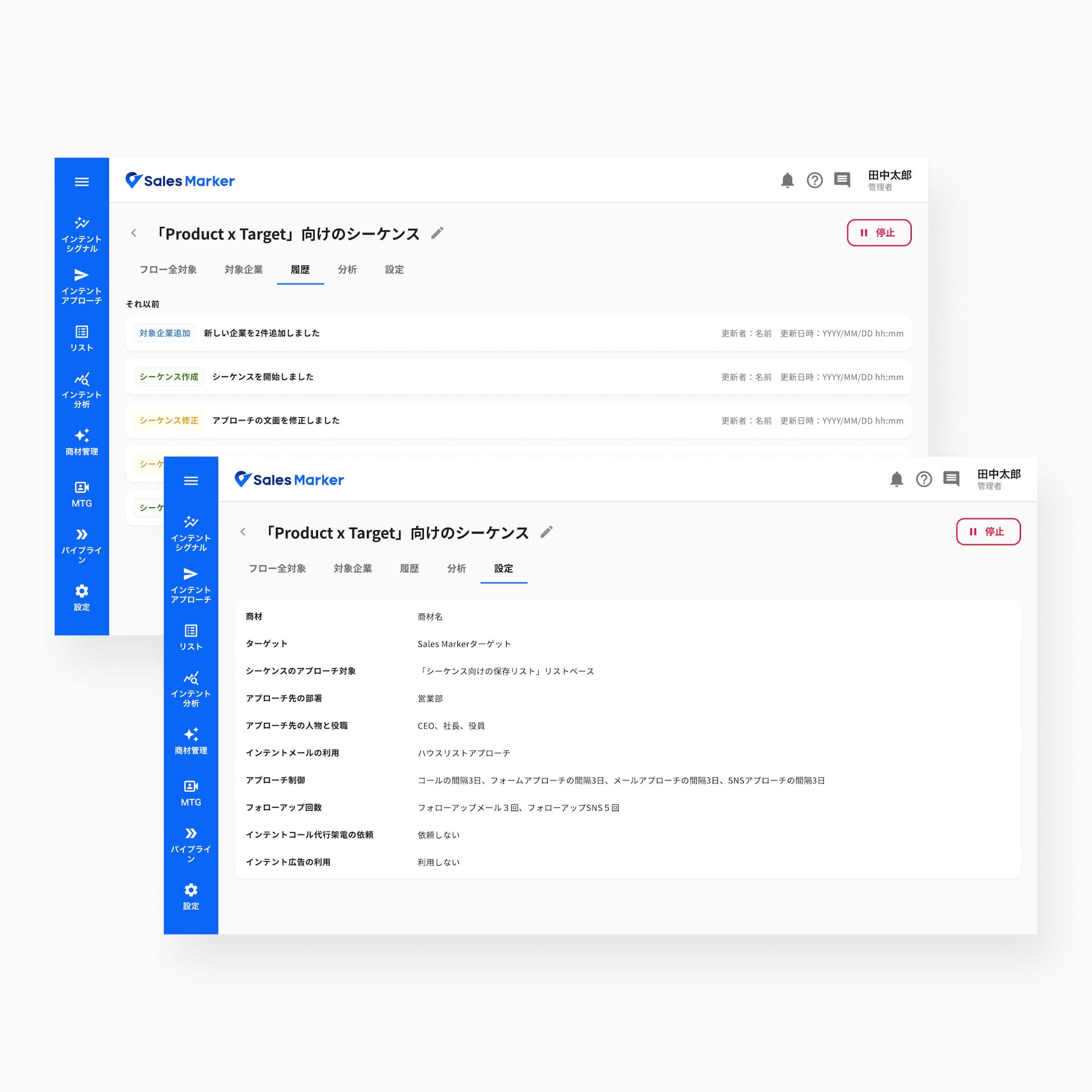
Before
- The sequence flow is visually dense, making it difficult for users to understand the overall structure.
- The workflow requires users to read both vertically and horizontally, which makes the execution path harder to follow.
- The flow does not clearly communicate the current operational status.
- The flow steps are fixed, preventing users from modifying or customizing the sequence structure.
- Although each node is clickable, the interaction model is not intuitive.


After
- The sequence flow is redesigned as a vertical workflow, making the execution path easier to understand.
- Users can add steps and create custom sequences by defining each approach action.
- Users can configure the interval period and triggers between each step, allowing more flexible automation.
- Two flow modes are introduced: before activation, where users can edit and configure the sequence, and active mode, where users can monitor the sequence with real-time execution data for each approach.
Approach detail page
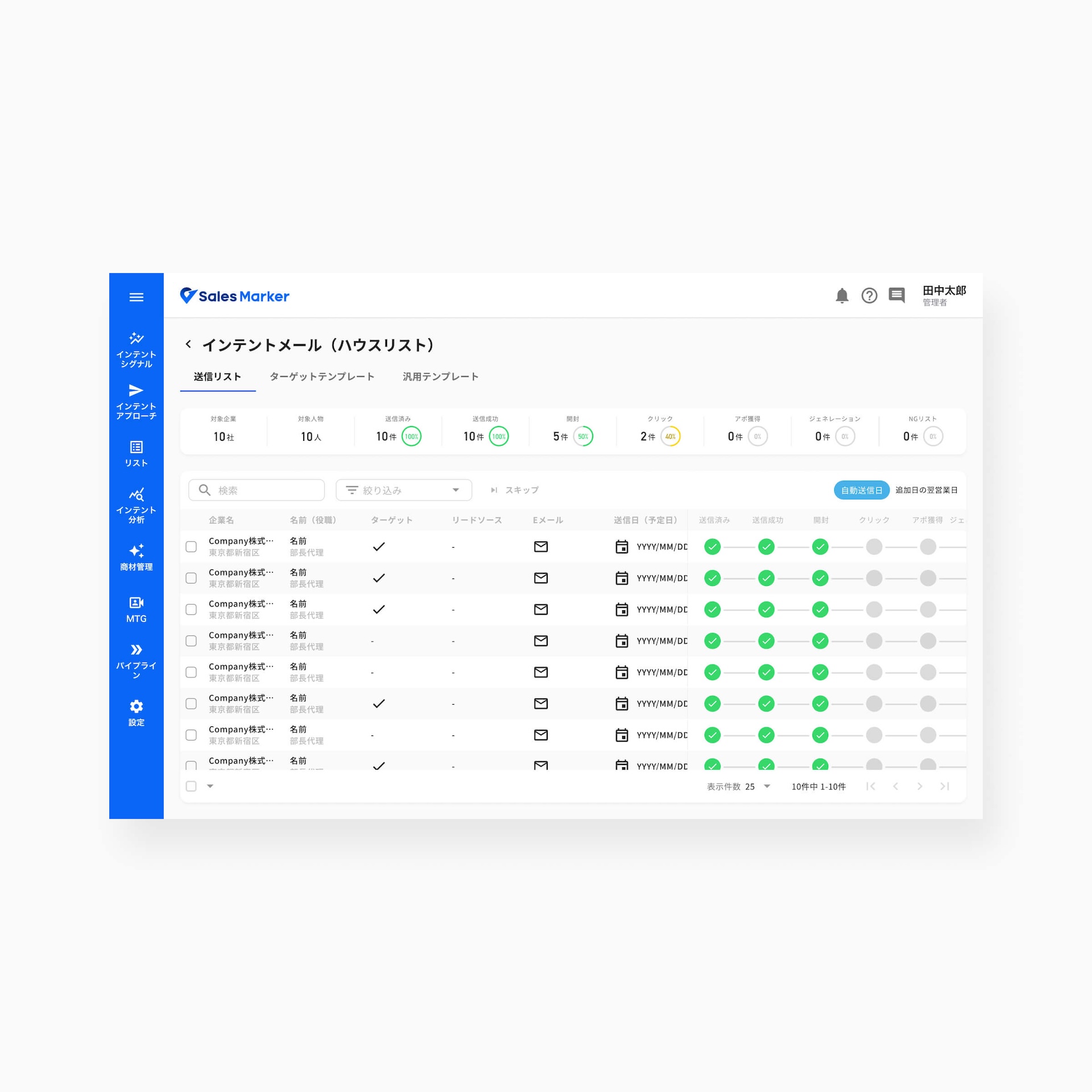
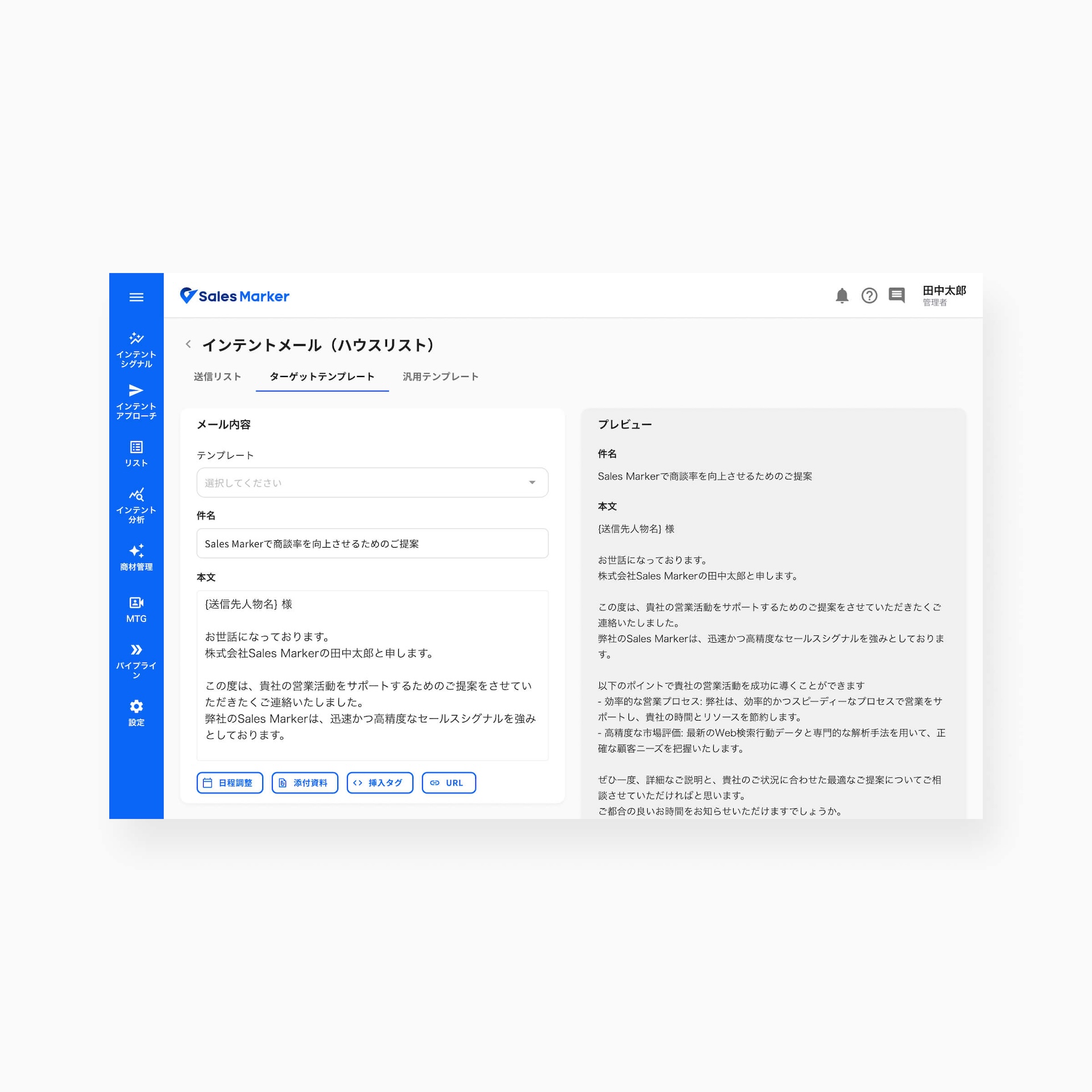
Before
- The sending list table contains optional columns (e.g. target, lead source), making the information hierarchy unclear.
- The Target and General Template tabs provide similar functions, creating confusion for users.
- Content type options are limited, for example only text emails are available.


After
- The sending list table is simplified to display only essential information, improving readability and focus.
- The template flow is unified into a single template based on the selected target settings, reducing confusion.
- Users can create a new list or start another approach channel directly from the sending list.
- Users can choose the content type based on their needs, such as text email or HTML email.
Next feature
The sequence feature is continuously improved based on feedback from clients and the product team to enhance usability and user experience.
The next major improvement is AI-assisted sequence creation. Users will be able to generate a sequence automatically based on their objectives.
AI will configure key elements such as the target audience, approach combination, step intervals, and triggers.
The approach content will also be automatically generated and configured according to the selected strategy, reducing setup time and helping users create effective sequences more easily.
Functionalities preview
In parallel with the Sequence feature, I had the opportunity to work on several other key product initiatives.
I designed a customizable dashboard experience for sales teams, allowing users to create their own personalized views. Users can generate AI-powered charts using natural language prompts and refine them manually.
I also worked on improving the lead profile experience by organizing lead information, highlighting key behaviors and intent signals, and helping users identify the right timing to engage with hot lead.
Sales Marker integrates with external CRM tools such as Salesforce and HubSpot. I worked on improving these integrations to provide clearer sync visibility and consistent data across platforms.
Additionally, I contributed to an advertising feature that connects with a third-party ad platform to publish campaigns across business media websites. The system collects company and person engagement data from ad viewers, enabling users to retarget high-interest prospects.


